
Microsoft Fluid Framework – The future of web collaboration

At Build 2019, Microsoft announced Fluid Framework, a new technology and set of experiences that will make collaboration seamless by allowing real-time low latency collaboration, breaking the boundaries between document types. In this event, Microsoft demonstrated various use cases of Fluid Framework like real-time collaboration and co-authoring, compound documents, AI-based real-time translations, editing suggestions, intelligent agents, and more. In the keynote example, if multi-persons are co-authoring on web or document content with Fluid Framework, then the text typed by one person on the screen will appear instantly on other screens without any delay. Fluid co-authoring experience is much faster than the current experience that we have in the Office documents. In the current experience, multiple team members can work on the same document, but still, the content tends to appear in chunks and not in real-time. “Fluid Framework lets us decompose a document into paragraphs and individual components, take a table, paste it into another application, like Outlook or Teams, so that people can collaborate in the context of where they are, and continue to do their own work,” said Rob Howard, general manager of Microsoft 365 Foundations. The most exciting and powerful keynote example was integrated experience across the applications using a componentized document model. In this example, if one person is working on Word document and needs suggestions on just one piece of content like a table or paragraph from other team members, then in this case, instead of sharing the entire document to another team, you just need to copy that content block and move it into another application like MS TEAMS or drop it into an email. No need to pull other team members into that document and find out where they need to put their inputs. They just have to update that piece of content in the shared application, and it instantly gets reflected in the source document. With the componentized document model, Fluid Framework allows authors to deconstruct content into collaborative building blocks that can be used across applications and combine them in a newer flexible kind of document that is not limited to MS Office document or spreadsheet or a slide deck. In Windows, with OLE objects, we do similar type of functionality, but performance is abysmal, thus not widely used. One key part of Fluid Framework is AI-based tools and intelligent agents to work alongside us to translate text, fetch content, checking compliance, suggesting edits, and more. AI-based agents provide more integrated experience by suggesting the best kind of chart to visualize the data in a table, relevant images, or translating phrases. In addition to the real-time co-authoring, Fluid framework having the ability to provide AI-based real-time translations into eight different languages. In the keynote demo, while typing into Word document, Azure Cognitive Services (AI routines) translates the text into eight different languages in sub milliseconds. The interesting thing is that the users are not only able to view the text into their own language, but they can also update it in their own language as well. Above: Microsoft’s Fluid Framework. Image credit: Microsoft To build apps and services using Fluid Framework, developers will have to get an early private preview. On the other hand, users with a work or school account can try out the experience at public preview. Currently, Microsoft is putting the finishing touches on the preview that will be available to Microsoft 365 customers in the next few weeks.
Project Server based customization deployment troubleshooting

While deploying the project server from one environment to another, we face lots of environment-related problems. This blog discusses the issues faced while migrating the environment and the method to overcome the problems. Failed to save Project Site as a template You have successfully created the project and project site, on the staging server after migrating the development database to staging database and implemented a few changes suggested by the client in the project site. When you try to save the site as a template, you might get an error message “something went wrong.” When you check the log, you will find the below error. This error occurs when distributed and cache service was not installed on the server. By running the below power shell command you add the service. Add-SPDistributedCacheServiceInstance. You tried to save the site as a template and got the same error “something went wrong,” however in SharePoint log; there was a different error. You can also see that the default project site is getting saved as template successfully; however, the custom site template is having this issue. To debug, you tried to delete all customization from the custom template and tried to save as a template. But the issue is still not resolved. After comparing the site features of the default project site and custom project site, we found that the below four features were activated in the custom site template, which were not activated in the default project site. After deactivating these features, save site as template functionality. Workflow opens to a blank page on SharePoint Designer 2013 You have migrated project server 2016 development instance to staging instance. You have opened the project server site workflow in the staging environment using SharePoint designer 2013. Staging workflow is visible here but, when you try to open it, a blank page is seen (as indicated in the below picture). The same workflow was working fine in the development instance To resolve this issue, you need to clean up the cache of SharePoint designer by following the below steps Close designer if already open Open address bar and open location %USERPROFILE%\AppData\Local\Microsoft\WebsiteCache Delete everything on this location Clean the location %APPDATA%\Microsoft\Web Server Extensions\Cache Uncheck “Cache site data across SharePoint Designer Session” as shown below Now reopen designer and try to open the workflow. If you can still see the same blank page without any stages, then install the service pack for SharePoint designer and install the hotfix (spd2013-kb2837633-fullfile-x64-glb) from below link and again clear cache. https://www.microsoft.com/en-us/download/confirmation.aspx?id=41491 .Now you can open project workflow, and it must be working. If you face a similar issue while deploying the project server from one environment to another, the above steps can help you save time.
The comprehensive help desk application you were looking for

One of the most significant problems faced by companies, IT departments, production plants, and facility management departments is lodging of complaints in their daily operational activities. Are you looking for a software or application which can take care of these problems? Are you looking for a solution which can automate the process of raising tickets? If you are, then you must know about Helpdesk application for O365 which can automate the process of generating and managing tickets. Here are some features of Help desk: Ticket generation through an email: Technology is growing exponentially, and there is automation in every sector. People do not have time to place a complaint manually. Help desk system on O365 can play a crucial role in this automation where one can send an email to helpdesk account and ticket will be generated automatically. Automatic assignment of the ticket to the technician based on the Business rule: Assignment of the ticket to the concerned person manually will lead to a waste of time. With Help desk, it will be possible to allot the ticket to the concerned person based on their role. SLA violation/ escalation of the ticket if tickets are not resolved/responded on time: There are many tickets which may not be responded and resolved on time due to various reasons. Manager or HOD has to be notified about this delay so that they can take further action Help desk SLA violation system will automatically check if tickets are not responded or resolved on time and then a notification will be sent to the manager or HOD. Work log assignment: It is essential for the manager to know the distribution of resource and with Help desk, team member/technician of the assigned ticket can log their work hours(duration). The manager can also view the number of tickets raised during a period. Task delegation: Many a time, it happens that technician is very busy with some task and there is another high priority task that needs to be completed, or he may require some help from sub technician. Helpdesk system provides a mechanism where a technician can manage his/her assigned task by adding sub-technician or helper to accomplish the given task. They can also add worklog hours to each task. Ticket approval: Some tickets are created which may require approval from higher authority. Within the Help desk system, the approver can manage and validate the tickets. Ticket detailed history: A detailed history of each ticket is maintained in Helpdesk which can be referred at any point of time. It is also possible to generate reports using the ticket lifecycle feature. Convert the ticket to change management: There are some complicated tickets which need proper planning and approval process. These types of tickets can be converted to change management process. Help desk system is a complete automation solution for managing and solving customer tickets with bare minimum efforts. This application helps in better customer satisfaction and an increase in productivity of technician.
Governance Considerations for Not-so-large Organizations

Technology is a key investment in most businesses—including startups, and small or mid-sized companies. Whether it is product development or operations—technology decisions are fundamental to the business model. Regardless, IT Governance takes a back seat as these businesses race to bring the product to market, serve their customers, find investments and scale. Technology decisions are often guided by owner preferences, and concerns of costs. Monitoring and control do not seem to be priority as owners (and/or key employees) may typically have intimate knowledge and understanding of “everything” in their IT. But as businesses scale such lack of rigour imparts costs. The operational infrastructure can impede growth, poor decisions may lead to costly rebuilding, compliance and security issues may have disastrous consequences. The most common reasons observed are the lack of awareness, fear of losing flexibility and decision-making styles. The lack of delineation amongst various functions in business and within IT makes it difficult to apply governance principles. Stress on velocity, high regard for immediate team concerns and preferences, apparent ability to patch through multiple systems, and general lack of board’s (or advisors/ mentors) focus on IT Governance also contribute. Author’s Recommendation FROM EFFICIENCY TO ADVANTAGE POWERFUL DECISION MAKING WITH BI Nonetheless, IT Governance is not just beneficial for all stakeholders, it can quickly become an important enabler as businesses grow. It is in the interest of the founders, employees, customers and investors, that the key IT decisions and their implementation is done in a consistent, holistic and comprehensive way which are also aided by an objective oversight. IT Governance frameworks (such as COBIT 5) help to achieve these exact goals. It plays a critical role in ensuring that company continuously delivers benefits while balancing risk and costs. IT Governance practices can be very different from those in larger enterprises. The various aspects of governance have to be tuned and fitted—and at the same time allow inclusion of increasing rigour as business grows. Any approach to IT governance for a smaller business has to include mechanisms of oversight with focus on company’s objectives, monitored investments and projects, choices driven by larger enterprise architecture concerns, right hiring, and adopting an appropriate level of formalism with documented processes, measurable goals for projects and investments and regular review. At the same time, needs of flexibility, economy and speed must be incorporated. Right governance bolsters business’s capability to use technology in the most effective manner. It imparts confidence, bring in innovation and reduces risks. Implementing governance principles in a consistent manner can, however, be daunting. Especially when companies may not find it viable to create and maintain dedicated IT leadership, or where the leadership is stretched thin as technology choices, implementation considerations and operational details require substantial time and consideration. Such businesses would be helped immensely with a trusted technology consultancy, which can understand their unique context and help ensure governance as a virtual CIO.
5 tips for a successful Office 365 intranet

O365 is a powerful tool for collaboration and improving employee productivity. O365 with SharePoint provide modern ways to communicate and organize information and documents. Have you been able to leverage your O365 investment to the full potential or do you want to move from an existing traditional intranet to a modern communication platform? Do you want to reap full benefits of O365 to build superior Intranet capabilities for your organization? If yes, then here are quick five tips to make your Office 365 Intranet a success. Prioritize O365 tools for your Intranet Assess the immediate needs and prioritize the O365 tools that are required for execution. Trying to achieve more without a defined plan would result in slow adoption and engagement. Plan phase one for immediate needs and get that running. Being agile makes it easier to adopt and to determine needs for the next phase. Train employees on how to use the intranet effectively and educate them on how it improves organizational productivity. Make sure you communicate the best practices to use the company Intranet. Gather regular feedback from the teams and share it with the Intranet managers for further improvements. User experience Provide a consistent user experience and navigation across the Intranet site. Remember, personalization is the key. Users appreciate personalized and contextual information than spending time on searching for it. Your Intranet should be able to provide contextual information based on role, location, and interest of your employees. Provide one single place for all your company information Make your Intranet the home page, one single place for all the company information including news, blogs, announcements, links to internal applications used often such as payroll, leave management system and timesheet. Provide users with the flexibility to personalize and change the placements of the widgets as they would like. Enable enterprise-wide social engagement The global market for Enterprise Social Networking continues to grow and is pegged to reach US$4.8 billion by 2023. Yammer being an effective social tool becomes an essential element of any organizational Intranet. Integration with social channels such as Yammer, Twitter, and Facebook helps you gain real-time conversation. Provide anytime anywhere access SharePoint online, an important tool of the O365 intranet, enables to provide access to sites, documents and information anytime, anywhere. Without any infrastructure overhead, you can easily meet the compliance requirement and share information from mobile device, office, or from home. Now that you know what it takes to build a successful O365 intranet, here’s the next step. Connect with us to know where you are on the Intranet journey, and get a free intranet guide. Want information about our work management and business productivity solutions? Click here.
Seven business hurdles your intranet must solve

Gone are the days when organizations used to have a standard one-way corporate communication system. With the changing business landscape, companies need more efficient and streamlined processes and systems. Many organizations are realizing that their employees encounter challenges with collaboration, communications, document management among others resulting out of the systems in use and working in silos. Some of the common problems faced are – information spread across documents at various locations and in different formats hinders content discovery and makes it difficult for remote workers to work together with their team. Do these problems sound familiar? If yes, you should implement an Intranet within your organization, which will not only allow your employees to engage and connect better but will also help them access, share, and work together in real-time to get their job done without any mess from almost anywhere. Though there is no one-size-fits-all solution that works for every organization, every company has its own set of unique goals and objectives. You must assess and understand your requirements and priorities before choosing an Intranet solution for your business. Modern intranets should not just look pretty but should be engaging enough to offer some of the basic and essential features an organization needs. Whether you are planning to implement a new intranet solution or upgrading the current one, below are some common problems that an enterprise-grade intranet solution must solve: Unable to access important documents outside company boundaries An ideal Intranet should not limit its access within organizational boundaries; rather it should be accessible to all your employees, all the time even though they are in offices, working remotely, traveling, or at home. This will help them to be productive and up-to-date all the time. Information is cluttered and spread across all documents and portals Ability to quickly locate the information users need to get their work done is what makes an intranet valuable. Because, an intelligent and tailored search saves a lot of time and effort, and increases the credibility of the system among users. Working together on documents with co-workers is difficult Working on projects requires team members to collaborate in real-time. But most of the organizations find it challenging due to several reasons – documents are not stored or named correctly, this is not the latest version and so. Co-authoring documents keep the team informed about each update made by the other team members and boosts the overall productivity. Dropping employee engagement Employees are vital assets for any organization and many, keeping their workforce engaged is easier said than done. A modern intranet solution should offer two-way information exchange which makes employees feel that they are important and help build an extraordinary workplace. Struggling with business applications One of the good things an Intranet can provide is the integration with other business applications already running across the organization. So, employees can log in to a single portal and access other productivity tools and applications seamlessly. For example: Want to fix a machine issue? Raise a ticket right from the intranet itself. Lack of fresh ideas Innovation is critical for every company to be successful and it comes from ideas, for which employees are the best source. But the lack of a platform to quickly participate and ideate is the reason behind disposal of many great thoughts. An intranet must offer the capability to share, rate and select innovative ideas that can give your business a new height. Unappealing interface Customized themes for an intranet based on upcoming festivals, events or any other occasion makes it more appealing and increases the company-wide adoption rate. There can be some pre-built themes or do-it-yourself (DIY) feature, so that companies can create themes according to their brand’s look and feel. Intranets are becoming an integral part of organizations these days, and when you use the intranet for your business, many of the hurdles faced by workforce tend to disappear. Once you’ve found the right intranet solution, you will soon see the differences it will make to your organization. But, while selecting the right solution for your business, you need to be careful. Always consider and evaluate the options available in the market and choose the one which fulfils your requirements.
6 Ways to Get Most Out of Your Business Intranet

The value of a corporate social intranet can be huge for your global organization if maintained effectively. Modern social intranet provides new ways to connect, communicate, collaborate and bring people from across departments, together. To ensure that you get the most out of your intranet, here are a few intranet features that could have a significant impact on your organizational collaboration and communication. Consolidate Processes The best way to cut down your workload is consolidating processes, which is very easy and one of the major perks of the modern intranet. This not only helps in saving the organization’s money but also helps in freeing up time so that employees can focus on the work that really matters. HR professionals often need many different applications throughout their week for various everyday tasks. But with modern intranet, they can easily make updates from one place, making their job much easier and employees’ overall experience better. Advaiya’s AdVanced intranet allows HR to easily handle leave management, project management, scheduling and many other processes very easily. Complete Online Knowledgebase Your intranet should act as a one-stop-hub for all employees’ information. For quick questions and answers, the best thing you could have is an Online Knowledgebase, which contains information displayed through text, videos, and images for each department. AdVanced intranet is designed with a search functionality to help pull the required information quickly, freeing up HR from being the middleman. Video Library A modern intranet can help you embed videos as a source of information for your staff. Videos could be latest marketing trends and updates, FAQs or messages from the CEO. And, having a central library of internal videos make it very easy for the employees to locate them on your company intranet. Employee Engagement With widgets for Employee Recognition, Events, Media section in – AdVanced Intranet – make celebrations central. It is accessible to employees to recognize a colleague for good work, send birthday wishes, share office events photos and videos, to improve employee engagement within the organization. Corporate Contacts With modern intranet, increase business efficiency by reducing the time it takes to look up and search for external contacts. It will allow you to create a complete list of external contacts and their details, and group them at a single place with security permissions. Enhance Collaboration One of the primary reasons why companies today are increasingly implementing social intranet is that they can be used as drivers for better collaboration and communication. Unlike the traditional intranet, where only Email was used to connect and pass documents back and forth, modern intranet like AdVanced provides a centralized access to easily collaborate and communicate across the organization. Facilitating multiple people to work on similar content, modern intranet allows work done more effectively and streamlined. Know more on how Advaiya’s AdVanced Intranet can help your organization better connect, engage, and collaborate. Get in touch with us for a live demo.
5 Ways Modern Intranet can Help in Marketing Operations

Marketing is one of the key business functions within an organization. Without an efficient marketing plan in place, even the best services and products can have a tough time finding the relevant audience for it. To strategize, plan, and execute campaigns, marketers need to organize and streamline everything to keep up with the fast pace of digital media. Wouldn’t it be great if the marketing team can rely on a single place to dump all the assets, easily access them whenever needed, collaborate and share, and stay updated all the time. Modern Intranet can serve as the perfect vehicle for running your marketing operations smoothly, taking it to an entirely new level. It can help in streamlining and speeding up processes – getting information from a single place even on the go, taking input/approvals from top management, peers, audiences, or maintaining all campaign details for reporting. See how it can make life easier for the marketers: The whole organization on the same page Poor internal communication often leads to missed opportunities. Marketing team continuously work on time sensitive deadlines, and they cannot entertain any delays. When the right people aren’t brought into the conversation at the right time, then opportunities are missed. A social intranet increases organizational intelligence and allows teams to interact with each other and share useful information across departments. Social networking capabilities help team members from across borders to discuss and work on projects collaboratively. Here’s a screen from Advaiya’s AdVanced Intranet that allows all your company’s information and updates to be displayed at one place. It’s your Home Page @ work. A centralized hub to maintain brand consistency One of the key challenges marketing department faces is to ensure that their brand is consistent across every region, department or languages. Modern Intranet provides a centralized storage of brand assets. Your company’s intranet can provide guidance on how any brand assets can be used. With the help of internal social networks, you can ask experienced colleagues to share the best practices for others to follow. Advaiya’s Advanced Intranet allows employees from the organization to provide guidance and share their knowledge with their colleagues. Regular updates on business needs Modern Intranet provides an excellent platform for updated company information to alert all your employees about the change in policies, benefits, awards and recognitions. etc. Here’s a screen from announcements section of the AdVanced Intranet. The departments are all notified for any new happening throughout the company. Easy access to Client Data For marketing department having easy and quick access to customer data is very important. A modern intranet can be used as a virtual database, which allows your staff to input all the relevant information. Having quick access to useful information means not having to scramble everywhere to find it as and when required. AdVanced Intranet provides quick access to all the important documents and makes it easy for you to find the relevant information at a single place. Increased collaboration in the organization Collaboration is a central focus for many businesses. Marketing department often needs to collaborate with other departments to come up with great ideas to get a product out to its potential audience, or answer a media query on specific services. If team members can collaborate easily, they can discuss strategies quickly and determine how they can move forward with the clients. With AdVanced Intranet, you can experience centralized communications and collaboration across your organization. I’m sure you are interested in knowing more about how AdVanced Intranet can help your marketing team in getting things done quickly and efficiently. For an individual meeting to discuss how AdVanced can help you and your team become more efficient, contact us via: Phone: +1 (425) 256 3123 Email: connect@advaiya.com
Handling Managed Metadata Using SharePoint List Workflow
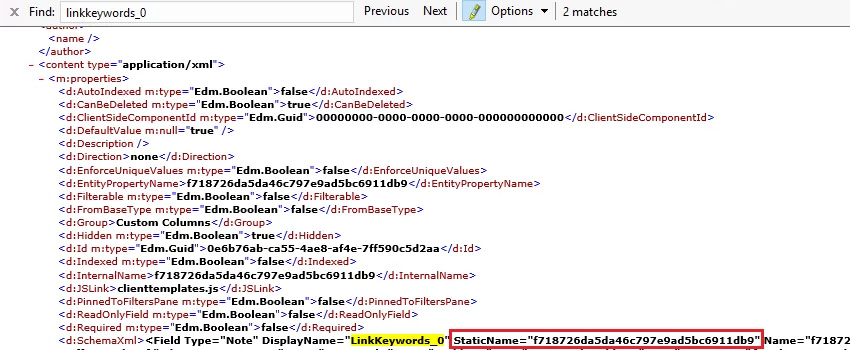
Recently we did a couple of Project Server/Online Implementation based projects which included customizations like Demand Management Workflow, Document Approval workflow, Issue or Risk Escalation workflow and much more. This required Project workspace customization to enable standard processes for every project within client EPM tenant setup. During these customizations, one challenge was to apply an item approval workflow for a custom list of the workspace, and when the list item is approved, the list item should be copied/moved to another list which has all approved list items only. We thought this should be an easy solution using SharePoint designer workflow and should not take much time to implement 🙂 but twist came when we found that a list item can be copied easily by using Create new list item/Update List item workflow activity but any managed metadata column does not follow this. Below is the detailed error and solution, how we customized the managed metadata updates on a SharePoint list using SharePoint Designer. Scenario: In SharePoint Designer you can use the “Update List Item” action to update a field in list or document library. But, whenever you update a managed metadata field through the “Update List Item” action, or you create an item from one to another list containing managed metadata field through the “Create item” action, a BadRequest error occurs: Follow below-given steps for the solution to your problem: Let’s, create two SharePoint lists, Pending Links & Approved Links. New link item is added to Pending Links; then it is routed to Link Managers for approval. If link item is approved then it is copied to Approved Links, else remains in Pending Links. Add managed metadata field, for, e.g., LinkKeywords, to both lists. Both Pending Links and Approved links contains these 3 fields : Note: Managed metadata field name should not contain a blank space. Otherwise managed metadata field value would not be updated using workflow. SharePoint will automatically add another field called “LinkKeywords _0”. Steps 1. Get the internal name of LinkKeywords_0: Go to https://xyz.sharepoint.com/site/_api/web/lists/getbytitle(‘listtitle’)/fields Static name for LinkKeywords_0 hidden field is “f718726da5da46c797e9ad5bc6911db9”. 2. Get the list item type entity type full name: Go to https://xyz.sharepoint.com/site/_api/web/lists/getbytitle(‘listtitle’) ListItemEntityTypeFullName of Approved Links is “SP.Data. Standard format for ListItemEntityTypeFullName is “SP.Data.<>ListItem”. Space in list title will be replaced by “_x0020_”. 3. Add workflow action to create item: Use workflow action “Create list item”. Item will be created from Pending Links to Approved Links, whenever task outcome is approved. Add fields other than managed metadata field. The outcome of this process will be taken into NewItem variable of GUID type. Here, do not add managed metadata type field otherwise you will get error “An unexpected ‘PrimitiveValue’ node was found when reading from the JSON reader. A ‘StartObject’ node was expected”. Now, workflow has been configured to create item in Approved links, but managed metadata field has not been updated on list item. To do this you need to use workflow action “Call HTTP Web Service” followed by building required dictionaries. 4. Build Headers dictionary to store following headers: Use workflow action “Build Dictionary”. 5. Build metadata dictionary for List item type: Use workflow action “Build Dictionary”. 6. Build the data dictionary: Use workflow action “Build Dictionary”. 7. Call HTTP Web Service: Use workflow action “Call HTTP Web Service”. Add Service URL of item to be updated: ID can be retrieved as: Where NewItem is GUID of item added to Approved Links, on which you want to update managed metadata field value. Change HTTP method to HTTP POST: Set HTTP Web Service Properties as: 8. Publish workflow. Final workflow appears as: 9. Add new item to Pending Links as: 10. When a new item is created, it’s approval status will set to Pending Approval as: A task approval will be processed for Link Managers. 11. If link item is approved then Approval Status will set to Approved: 12. New item will be added to Approved Links as: So, now using these steps you can updated managed metadata field. Hope, it was helpful to you.