
Products – enterprise resource planning (ERP)
BankSync
365
Connect, sync, and simplify your banking
Products – enterprise resource planning (ERP)
Change log archival for
Business Central
BankSync 365 enables secure, reliable connectivity between your bank and Microsoft Dynamics 365 Business Central through both host-to-host integration and modern API-based connectors. Whether your bank supports direct file-based communication or real-time APIs, the solution ensures seamless data exchange for payments, bank statements, and transaction updates by eliminating manual intervention and reducing operational delays.
Designed to work with a wide range of banks, the app delivers automated synchronization, improved accuracy, and faster financial processing. From streamlined bank reconciliation to real-time visibility into cash flow, Advaiya BankSync 365 helps businesses simplify banking operations, enhance control, and scale effortlessly with a future-ready integration framework.
Key Features of BankSync 365
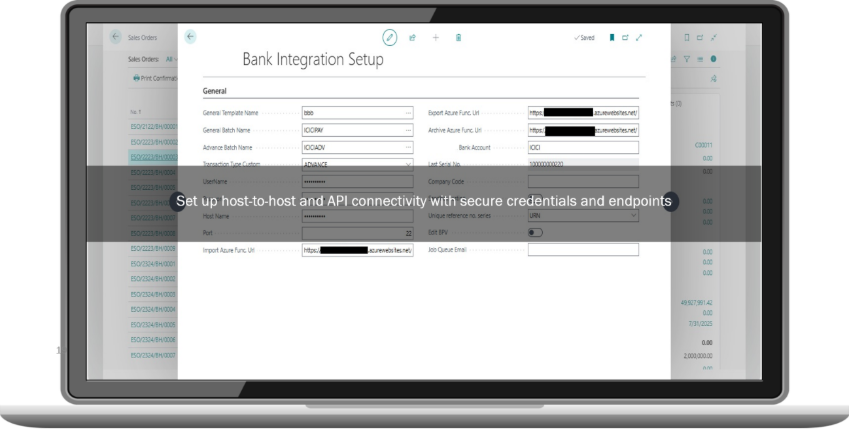
Host-to-host bank integration
BankSync 365 enables secure, direct connectivity with banks using host‑to‑host integration for automated file-based communication. This removes the dependency on manual file uploads and downloads while ensuring reliable and consistent processing of bank files. By automating file exchange, organizations can reduce processing time and improve operational continuity within Business Central.
API-based bank connectivity
The app connects with bank APIs to enable real-time data exchange between banks and Business Central. This allows faster access to bank transactions, balances, and payment updates without waiting for batch file processing. As a result, finance teams can work with up-to-date banking data and respond more quickly to financial activities.
Multi-bank support
BankSync 365 supports integration with multiple banks through a single solution, simplifying the management of different banking relationships. Organizations can operate across banks without maintaining separate tools or processes for each institution. This unified approach reduces complexity and provides a consistent banking integration experience within Business Central.
Real-time transaction synchronization
The app continuously syncs bank transactions into Microsoft Dynamics 365 Business Central, ensuring real-time visibility into cash flow and account activity. Automated synchronization minimizes delays in transaction availability and supports faster reconciliation. Finance teams gain a clearer and more accurate view of banking data at all times.
Payment processing automation
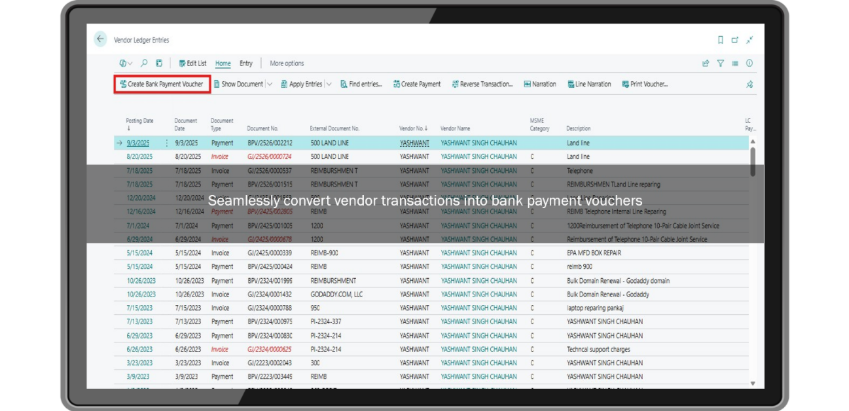
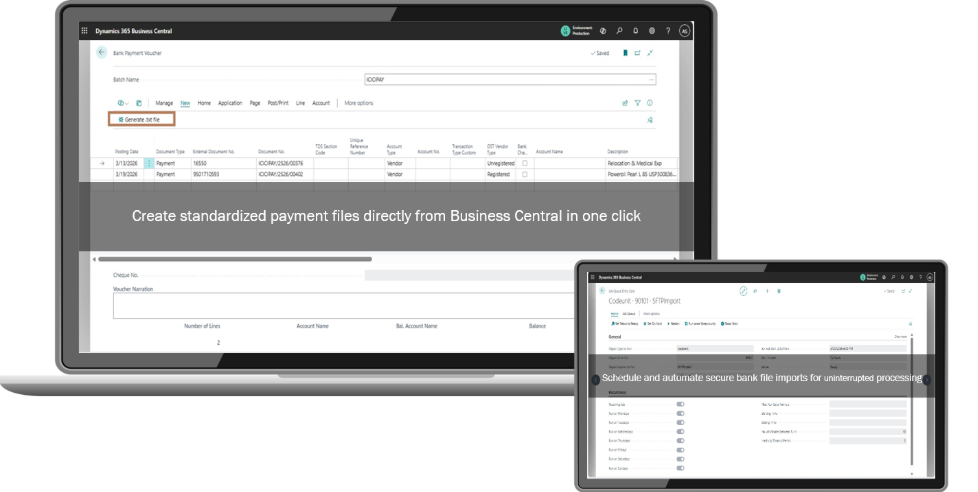
BankSync 365 streamlines payment initiation and tracking directly from Business Central. Vendor ledger entries can be converted into bank payment vouchers, and standardized payment files can be generated for bank processing. This automation reduces manual effort, improves consistency, and helps ensure timely payment execution.
Secure data exchange
The solution uses encrypted communication protocols to ensure secure data transfer between banks and Business Central. This helps protect sensitive financial information while supporting banking and enterprise security standards. Secure connectivity strengthens control over banking operations and reduces exposure to data-related risks.
Scalable integration framework
BankSync 365 is built on a scalable integration framework designed to support growing business and banking needs. The flexible architecture allows organizations to add new banks and integration methods without disrupting existing workflows. This ensures long-term adaptability as transaction volumes and banking requirements increase.
Addressing the Challenges through BankSync 365
Manual bank file processing
Manual handling of bank files often leads to delays, increased effort, and higher chances of errors. BankSync 365 automates bank file imports and exports, enabling uninterrupted and reliable processing. Automated job queues ensure banking operations continue smoothly without constant manual monitoring.
Limited visibility into bank transactions
Without automated synchronization, tracking bank activity can be delayed and fragmented. BankSync 365 provides continuous synchronization of transactions and balances, delivering real-time visibility within Business Central. This enables better monitoring of cash flow and financial positions.
Delayed payment execution
Disconnected or manual payment workflows slow down payment processing and tracking. By enabling payment initiation directly from vendor ledger entries and generating bank-ready payment files, BankSync 365 accelerates the end-to-end payment process. This helps organizations maintain timely and accurate payment cycles.
Scalability limitations
As organizations grow, managing increased transaction volumes and multiple bank integrations becomes challenging. BankSync 365 supports scalable bank integration, allowing businesses to expand banking operations without increasing operational complexity or manual workload.
Benefits of Using BankSync 365

Real-time banking visibility
BankSync 365 enables real-time access to bank transactions, balances, and updates directly within Business Central. This improves cash flow monitoring and helps finance teams stay informed about banking activities at all times.
Enhanced data accuracy
Automated synchronization reduces manual data entry and minimizes inconsistencies between bank records and ERP data. Accurate and reliable banking information supports smoother reconciliation and reduces rework for finance teams.
Improved financial efficiency
By automating banking integration and payment processing, BankSync 365 reduces operational overhead and streamlines financial workflows. Finance teams can complete banking tasks faster and focus on higher-value financial activities.
Reduced manual intervention
The app eliminates repetitive tasks such as manual file handling, transaction imports, and payment tracking. Reduced manual intervention improves productivity and ensures consistent banking operations.
Strengthened security and control
Secure connectivity and encrypted data exchange provide stronger control over banking operations. This helps organizations meet security expectations while maintaining governance across financial processes.
Why Choose BankSync 365?
BankSync 365 is designed specifically to integrate banking operations with Microsoft Dynamics 365 Business Central using a secure and reliable framework. It supports both host‑to‑host and API‑based bank integrations, enabling organizations to work with a wide range of banks without changing existing financial processes.
By delivering automated synchronization, improved accuracy, and faster financial processing, BankSync 365 simplifies banking operations while providing real-time visibility into transactions and cash flow. Its scalable architecture and secure data exchange make it a dependable solution for organizations looking to enhance control, efficiency, and consistency in banking integration.
Optimize ERP performance without losing historical records
Over time, continuous system activities generate large volumes of change log data within Microsoft Dynamics 365 Business Central, which can increase database size and impact overall system responsiveness. Change Log Archival helps organizations maintain optimal ERP performance by securely moving historical logs to Azure Blob Storage. This approach allows businesses to keep the ERP database lean and efficient while ensuring that historical system activity remains preserved and accessible whenever required.
Maintain reliable audit readiness and regulatory compliance
Organizations operating in regulated industries must retain detailed system records for audit verification and compliance purposes. The solution ensures that archived change logs remain immutable, traceable, and easily retrievable for auditors or compliance teams. By maintaining a structured and verifiable archive of system changes, organizations can confidently demonstrate adherence to internal governance policies and external regulatory requirements.
Ensure structured and transparent archival processes
Unlike manual archival or database cleanup approaches, Change Log Archival provides a well-structured framework for managing historical data. Every archival activity is logged and validated, creating a clear record of when data was archived, how it was processed, and where it is stored. This transparency strengthens operational oversight and provides administrators with complete visibility into the lifecycle of archived change log data.
Seamlessly integrate with existing Business Central workflows
The solution is designed specifically for Business Central environments and aligns with existing ERP workflows and operational processes. Organizations can implement the archival solution without major system changes or complex integrations. Users can manage archival tasks within familiar interfaces, ensuring a smooth adoption experience and minimal disruption to daily operations.
Support scalable and future-ready data management
As businesses grow, the volume of transactional and configuration changes recorded within the ERP system increases. Change Log Archival leverages the scalability of Azure cloud infrastructure, allowing organizations to handle growing volumes of change log data without worrying about database limitations. This ensures that the solution remains effective even as operational complexity and system activity expand.
Strengthen governance, accountability, and data traceability
Maintaining a complete history of system modifications is essential for operational accountability and risk management. Change Log Archival preserves detailed change histories, enabling organizations to trace exactly who made a change, when it occurred, and what data was modified. This level of visibility strengthens governance practices, supports internal investigations when required, and ensures that critical business processes remain transparent and well-documented.
Frequently asked questions
What is the E-Way Bill App?
An extension for Dynamics 365 Business Central that simplifies GST compliance by automating E-Way Bill generation, tracking, and validation at document and transaction levels.
How does the E-Way Bill App integrate with GSP Partners?
Seamlessly integrates with any GSP Partner, enabling automated bill generation, real-time reports, status updates, and comprehensive reporting within Business Central.
What challenges does the E-Way Bill App address?
Eliminates complex GST compliance processes, reduces manual errors, saves time, improves visibility into logistics, and streamlines data management for E-Way Bills.
What are the key features of the E-Way Bill App?
Automated E-Way Bill generation, enhanced transaction lines, accurate validation controls, order status tracking, user-friendly setup, comprehensive ledger, and seamless integration.
Does the E-Way Bill App reduce manual errors in bill generation?
Yes. Automated E-Way Bill generation significantly reduces manual errors and ensures timely, accurate bill creation with automatic numbering and comprehensive validation.
Who benefits most from the E-Way Bill App?
Businesses managing GST compliance and logistics operations benefit through reduced compliance risk, improved operational efficiency, better visibility, and accurate regulatory adherence.
Schedule a consultation
Related case studies






Related blog
Blog
- Business application, Business central, Business process automation, Check Lot Manager, E-Way Bill App, Insights Central App, Inventory Tracker App, Order Short Close, Project Progress Tracker, Purchase Requisition App, SOP Management App
- Business Central, Business Central Dynamics
Blog

- Business process automation, Check Lot Manager, Cloud migration, E-Way Bill App, Insights Central App, Inventory Tracker App, Order Short Close, Project Progress Tracker, Purchase Requisition App, SOP Management App
- BIM, Cloud migration
Blog

- AI, Business process automation, Check Lot Manager, E-Way Bill App, Insights Central App, Inventory Tracker App, Order Short Close, ProcureSure App, Project Progress Tracker, Purchase Requisition App, SOP Management App
- AI, Dynamics 365 Business Central
Blog

- AI, Business process automation, Check Lot Manager, E-Way Bill App, Insights Central App, Inventory Tracker App, Modern workplace, Order Short Close, ProcureSure App, Project Progress Tracker, Purchase Requisition App, SOP Management App
- AI, Peripheral Automation
Blog

- Business process automation, Check Lot Manager, E-Way Bill App, Inventory Tracker App, Order Short Close, ProcureSure App
- Manufacturing industry
Blog

- Check Lot Manager, Digital transformation, Dynamics 365, E-Way Bill App, Order Short Close, SOP Management App, Technology consulting
- advancing construction analytics, analytics in construction, big data analytics in construction industry, construction data analytics, construction data science, predictive analytics construction, predictive analytics for construction, predictive analytics in construction, workshop business intelligence