
What modern construction companies seek for success

In recent years, unexpected global forces have accelerated a powerful wave of digital transformation across industries. The construction sector stands at the forefront, leveraging cutting-edge technologies to thrive in an ever-evolving landscape. As we enter 2024, staying ahead of these trends is essential for construction companies aiming to maximize efficiency, drive productivity, and build long-term resilience. Evolving customer needs and technologies As customer needs evolve, technologies that were once deemed essential may quickly lose their effectiveness. Construction companies must remain agile and responsive to the changing digital environment to stay competitive. Below, we explore the key technologies and strategies that modern construction companies are adopting, along with the benefits of cloud-based ERP digital solutions, particularly for small businesses. Key technologies transforming the construction industry 1. Automation-driven efficiency with no-code solutions In 2024, automation will continue to dominate as a driving force in construction project management. Cloud-based ERP solutions enable construction companies to streamline operations, enabling leaders to achieve better outcomes with fewer resources. This results in efficient growth, improved productivity, and significant cost savings. 2. Mobile apps for worksite access The rise of mobile applications has transformed how construction teams access worksite information. These apps facilitate real-time inspections, on-site accountability, and accurate measurements through mobile cameras. A leading EPC organization successfully implemented mobile project portfolio management solutions to track essential KPIs, demonstrating the effectiveness of mobile technology in construction project management. 3. Advancing sustainability through technology Sustainability is increasingly becoming a focal point for construction companies. With rising energy costs and environmental concerns, almost every other company is investing in technology to improve sustainability. A recent report indicates that 74% of Architecture, Engineering, and Construction (AEC) firms are adopting green technologies. Cloud ERP digital solutions support sustainability efforts by providing valuable insights into resource usage, helping companies meet environmental goals while reducing costs. 4. Augmented reality and virtual reality The integration of augmented reality (AR) and virtual reality (VR) is gaining momentum in the construction industry. These technologies offer enhanced visualization, facilitating remote site inspections and improving safety and collaboration among teams. Tools like Microsoft HoloLens allow construction professionals to overlay holograms of their projects in real-world settings, significantly improving project execution. Challenges in construction project management Managing large capital projects poses challenges for construction companies, often resulting in delays, budget overruns, and execution issues. Common issues include repetitive reporting, fragmented data, and limited connectivity. Tools like Microsoft Project help streamline processes and enhance stakeholder communication, supporting more efficient project management. Delays, budget overruns, and execution issues, often resulting from complex project demands. Repetitive and time-consuming reporting processes that slow down decision-making. Fragmented data systems leading to information silos and reduced collaboration. Inadequate connectivity on job sites, limiting real-time communication and data access. Construction analytics for informed decision-making With high failure rates in large capital projects, construction business intelligence tools have become essential. Comprehensive analytics solutions provide real-time key performance indicators, enabling organizations to identify and address low-performing trends. This data-driven approach turns insights into actionable strategies, improving project outcomes. With high failure rates associated with large capital projects, it is increasingly vital. Advaiya Solutions’ comprehensive construction analytics solutions empower organizations to address low-performing trends by delivering real-time key performance indicators at project and portfolio levels. This data-driven approach transforms insights into actionable strategies, enhancing overall project delivery. Implementing Microsoft Project to streamline workflows and enhance communication among stakeholders. Utilizing automated reporting tools within ERP systems to minimize manual reporting and improve data accuracy. Integrating centralized, cloud-based ERP platforms for unified data access and seamless collaboration across teams. Deploying mobile solutions to ensure on-site teams have real-time access to project data and connectivity. Advaiya at Chicago Build 2024 Our presence at Chicago Build 2024 on October 22-23 was a dynamic experience, showcasing our latest advancements in construction technology! The event buzzed with industry innovators and construction companies ready to embrace change, and our booth became a hub for discussions on how cloud-based ERP digital solutions and advanced project management tools are transforming the construction landscape. Our team of experts demonstrated firsthand how these tools can streamline operations, boost productivity, and help businesses stay ahead in today’s competitive market. Attendees engaged in live demos, interactive sessions, and hands-on experiences that underscored the tangible impact of digital solutions on the construction industry. Conclusion The construction industry in 2024 is embracing a transformative shift driven by technology and sustainable practices. By leveraging cloud-based ERP digital solutions and embracing innovative tools, construction companies can streamline their operations and deliver projects efficiently. At Advaiya Solutions, we are committed to supporting construction businesses in their digital transformation journey. To explore how you can enhance your project management capabilities, connect with our experts today. Together, we can advance your construction analytics solutions and help your business thrive.
How your organization should draw the benefits of remote work

At a glance: How modern cloud-based business productivity solutions are revolutionizing the way of working remotely How technology is enabling organizations to manage staff online and reduce office overload. Helping business improve their enterprise productivity by maintaining effective communication between team members as well as clients. Providing great flexibility and improved employee experience by addressing the needs of remote workers Hybrid work became a norm during the pandemic as companies tried to cope with the lockdowns and travel restrictions. Employees not being able to come to the office or go meet the clients were initially seen as a crippling situation, but it quickly became an advantage with a leap in modern workplace technology. Modern organizations now have access to the kind of infrastructure needed to adopt hybrid work, thanks to the availability of modern work management and business productivity solutions like cloud applications. In fact, data suggests that the number of patents filed for technologies that support remote-work capabilities has doubled since 2020. This has remarkably improved the applications and software products that aid in online collaborations, digital data, and document management. The biggest example is the marked enhancement in features and capabilities of Microsoft Teams since its launch in 2017: The meeting recording features became refined Meeting transcription quality improved and became a default feature Earlier, there were restrictions on the number of participants. Now we can host up to 100-200 participants easily Meeting duration cap was removed. We can have long meetings on Teams now Overall network latency reduced, which allows for better screen sharing and collaboration The video and audio calling quality was improved Background noise cancellation ensures that you can effectively participate in calls, even from noisy environments Auto-join, auto-recording, and attendance report functionalities reduce the moderation efforts Now, even external participants can join easily without needing to have a Teams login. Browser capabilities have improved remarkably Overall processing requirements to run these applications are better optimized According to projections, SMEs will spend more than US$100 billion over the next few years on collaboration platforms, cybersecurity solutions, and cloud-based apps. This technology is a part of our daily lives now. Modern tech is used to run schools, hospitals, offices, and colleges. You can now work anywhere you want, collaborate seamlessly, offer enhanced customer service, and learn new skills online. How remote work has evolved Remote work was possible with the basic tools available before. There were always email and chat applications. Things like Dropbox and Google Drive were allowing data and document sharing. However, they were not integrated into a comprehensive suite of applications. Things had to be managed on separate disconnected platforms. For that reason, it was thought to be cumbersome and inefficient. It was fine to hire a part-time freelancer for remote work, but we were not used to seeing “remote” full-time positions at companies. Now, we have broken that barrier. Technology has made it possible to do the same job, no matter where we live. It has allowed us to always stay in touch with clients and coworkers. Reduce your office overhead According to a Gallup survey, 43% of employed Americans said they have spent at least some time remotely.” This means companies have already understood the benefit of remote work. They can more economically manage staff online than hire people for a particular location. Maintaining full-time office spaces is expensive. Think of the electricity bills you will save. HR can save relocation bonuses, transportation and conveyance allowances, and many such expenses. Improve productivity You’d agree that most of the time spent by employees in the office goes into doing unproductive work like gossip, unnecessary discussions, and just idling. It’s because the actual time to do things that are necessary is much less than the working hours. Having a remote workforce can help your team members get on to the priority tasks with to-the-point communication. They can also track their performance with productivity tools like planners and task managers. Enterprise productivity solutions can be used by organizations to maintain effective communication between team members. Greater flexibility and improved employee experience Companies are projecting themselves to be modern and progressive by adopting hybrid work culture and sophisticated workplace productivity solutions to address the needs of remote workers. Employees working remotely, whether they are in coworking spaces, at home, or elsewhere, can benefit from videoconferencing, file-sharing platforms, and project management tools. Want information about our business productivity solutions? Click here. In times of global crises like pandemics and geo-political turmoil, many see the option of working from home as a safe and considerate way of working. Companies willing to be flexible about working hours, location, and time zones are more lucrative as employers. Are you looking for a business productivity services partner? Advaiya provides digital transformation solutions for enterprise-level organizations. Our team includes certified professionals who can customize and implement the latest business productivity solutions according to your business needs. Saurav Pranay Saurav is a Microsoft certified member for Dynamic and Project Online and has over fifteen years of experience in Project and Process management and has been involved in many Dynamics and Project Online implementations and have addressed solutions to challenging business needs by clients.
Managing field workforces from home
Field workforce management is integral to the success and business continuity of the utility industry and is a growing part of the service industry. The overarching goal of field workforce management is to ensure that people are in the right place at the right time with the right information. Current practices in the industry are manual, disconnected, and missing customer expectations. Organizations need to change the way their field workforce is managed and operated. Field services teams are an integral and critical component for an organization to drive business growth and develop superb customer service best practices. In order to help field services team, reach their full potential, they need to be armed with cutting-edge technological resources. This will allow them to better meet customer demand and manage these distinct customer channels on one unified platform and this can all be managed in a remote setting. With the growth of tools such as mobile phones and tablets, technicians can work from anywhere. This provides an opportunity for companies to reduce costs while increasing productivity. However, managing this workforce requires remote requires careful planning and control through trusted enterprise tools and services. Although managing field service firms presents its own set of issues and is increasingly complex and costly. One of the biggest issues service companies faces is effectively managing their field employees as they may struggle with field management such as remote asset maintenance and repair issues, the loss of critical knowledge from seasoned to newer technicians, and building trust across the organization to create a transparent and unified field force. Some of the common issues organizations face with field service management are – Keeping track of the field technicians’ output Field superintendent views are limited, making it harder to track the production and efficiency of field workers. The majority of the time, there is either a gap in the assigned jobs completed or jobs submitted to service managers on time. As a result of this discrepancy, managers have difficulty understanding the productivity and performance of field technicians and scheduling intervention in the event of a work reschedule required. Want information about our field service management solutions? Click here. Other issues, such as “how productive technicians are,” “how long did he take to complete the work,” “how courteous was he with the client,” “when did he check in or check out from the job,” and so on, are not addressed. Scheduling jobs for field servicemen Scheduling jobs for field technicians is another difficult task that a Field Superintendent encounters. It goes without saying that evenly allocating field jobs can be a nightmare for field superintendents. Furthermore, task scheduling necessitates precision to ensure that a job is assigned to the most qualified specialist who is familiar with the job and proficient in its execution. That implies the manager must distribute jobs based on expertise while also considering considerations such as technician availability, proximity to the project site, and so on. In brief, the scheduler must manually handle a variety of aspects while limiting risk in the event that the team is large. This means that scheduling every single technician’s workday before they arrive on site can take up hours of valuable time when dealing with large amounts of data collection equipment being hauled around town each day! Hassle-free communication with field technicians Real-time information unavailability is one of the leading causes of poor field efficiency and productivity. Field technicians cannot constantly connect with the back office and ask for information or cannot move from one location to another searching for information. Field technicians need ready access to the customer database via the field service management app on their phones or personal devices for real-time access to data such as warranty and guarantee, service history, inventory details, and so on is feasible, increasing efficiency. Overcoming field service management challenges To overcome the challenges elaborated above, organizations need to move to an automated field management solution that will help connect the field technician and office together more efficiently. With the procurement of automated field management software such as Dynamics 365 Field Service, organizations can benefit in many ways stated below: – Field superintendents and technicians can connect them in real-time using the field management platform technology to identify and track jobs, routes, time, and feedback, among other things. Also, can benefit from this in several ways, as the software helps to track and monitor the field serviceman’s performance and assist the field serviceman in reporting his tasks on time. Scheduling for field technicians is a complex process because there are so many factors that play into such as“how long it takes and what type of equipment needs to be used during each appointment” the availability hours, and the expertise required to execute the job, etc. Field service management solution AI-based model determines the equipment required along with the field technician’s availability by taking into account several factors such as his current schedules, scanning skillsets from a workforce data source, and pairing the proper technician to a certain job thus making the scheduling and rescheduling of job easy and automated. It also uses GPS to track the technicians’ locations so that the appropriate field technician may be found nearby depending on the work requirements. Field workforce management solutions establish an automated platform for standardized communication flow, giving field superintendents a conduit to connect with technicians in the field in the event of a crisis. In general, Field solutions can send field technicians automated messages concerning schedule changes, plan changes, inventory data, client specifications, and so on, keeping technicians aware of the latest information and planning the work & routes accordingly. One single view of market, territory, and field technicians working on the job is an unmatched benefit offered by Dynamics Field Service solution that makes it very easy for the field superintendents & schedulers to manage, plan, and shuffle the jobs. Want information about our field service management solutions? Click here. Conclusion The benefits of using Microsoft Dynamics 365 Field Service to manage
Create a Digital Workplace with SharePoint and OneDrive
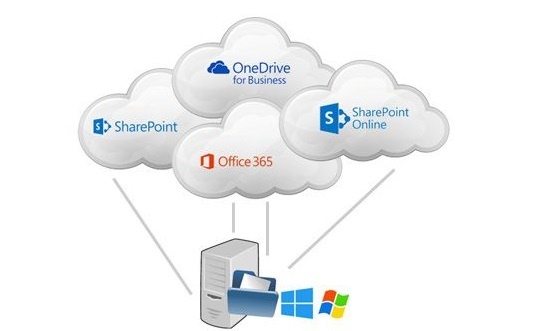
As technology evolves at a fast pace, trends at workplace change. Unlike traditional workplaces, where employees did their 9 to 5 job under the supervision of their managers, modern workplace is a completely different approach. Today organizations are spread across diverse geographical locations. Instead of working at one central geographical location, employees are working at various global locations and collaborating with team members at lightning speed. No matter where your workforce is stationed, technology has brought seamless connectivity amongst them. Physical boundaries are no longer a constraint. Employees can work in real-time, collaborate and communicate with each other in a very secure and effective manner. Since there are so many team collaboration options that come with their own unique set of features, it is intriguing to understand which technology can best suit your organizational needs. It is paramount to understand how to utilize the best out of the latest technology and existing investments. Since a modern workplace fixates on connecting multiple participants at various locations, it is supreme to decide how to best utilize the latest technologies. READ MORE INTERESTING ARTICLES MODERN INTRANET – COLLABORATE AT THE SPEED OF YOUR BUSINESS SharePoint and OneDrive connect the workplace with keenly intellective content management and intranets. Digital transformation is driving growth across Microsoft 365, SharePoint and OneDrive. Today many organization are using SharePoint and OneDrive. Customers are showing great interest in SharePoint online. A huge investment is also noted in OneDrive since last year. SharePoint and OneDrive make it effortless for you to collaborate. SharePoint has dependably been at the center of collaboration, people operating together on documents, lists, and libraries. With OneDrive, you can share your documents easily with individuals inside or outside the association in an exceptionally secure way. Its deep office integration powers rich co-authoring and allow real-time collaboration on these shared files with others. You can access all your office 365 files namely your personal work file, file shared with you by others, teams and your organization. The experience remains the same irrespective of the device you use whether it is a PC, Mac, Android device or iPhone or windows phone. With the all new simplified sharing experience, you can share a file or folder with specific people or even send a link that allows giving access to anyone inside or outside the organization. You can control access to a link for a specific period. It’s additionally simple to view and adjust the granted permissions. SharePoint has also come up with the communication sites which is a pleasing and dynamic site which lets you reach a broad audience to keep the organization informed and engaged. Communication sites look classy on the web, on a PC or Mac, on mobile browsers, and in the SharePoint app. While your team site lets you share within your group as you’re working, a communication site lets your group share broadly and communicate its message across the organization. News published on a communication site surfaces on SharePoint home in Office 365 and on SharePoint mobile to all users who have access to the site. These communication sites can be easily created in a few seconds and you can very well configure the default web parts on your sites page to tell your story. You can customize page layout with new multi-column sections and drag-and-drop authoring with a range of richly functional web parts, including an image gallery, interactive Bing maps, videos from a Microsoft Stream channel and a new events web part. SharePoint 2019 is coming up with the all-new hub sites which will allow you to easily organize your intranet. These bring together associated sites to roll up news and activity, to simplify search and create cohesion with shared navigation and look-and-feel. SharePoint hub sites are very scalable, as these can be rearranged as your need changes. Power apps in SharePoint provide a great ease in creating custom forms for SharePoint list and library. You can create interactive and pretty-looking forms without many efforts. This provides the ability to seamlessly integrate the process into your work. New built-in approval flows let you send any document for approval with a custom message. The recipient can approve the request directly from a rich, actionable email message, so approval and feedback can be given without leaving your inbox. SharePoint has a great search feature that leverages machine learning and artificial intelligence from Microsoft Graph API to surface more relevant and valuable result. The search content is included with your sites, files and news. Search can also be performed on people who belong to your organization. The result will include their skills, interest, projects etc. which are part of their office 365 profile. Along these lines, SharePoint is ceaselessly progressing towards giving a rich and consistent user experience, satisfying the necessities of the current Digital workplace and furthermore working towards future prerequisites.
Locally add the Add-In task pane in Word from SharePoint

Adding the Office Add-in in the Word document from the SharePoint document library is quite easy. The task pane is added in the Word document on the right and every time a document opens, the task pane appears. But, if the user closes the task pane from Word, the add-in won’t appear anymore. The user must manually add the add-in every time to use the Word task pane – open the document in the browser from the SharePoint library and add the add-in in Word. Then, on opening the Word document in Word client, the task pane will appear again. This process of adding the add-in every time is hectic. To overcome this challenge, we can add the Addin from the Word client and use it directly from there. So, there would be no need to open the document in the browser and then use the add-in. These are the basic steps to achieve it: Open your Word document. Click on File -> Options. Select Trust Center -> Trust Center Settings as you can see in the below screen. Select Trust Addin Catalogue. You can either provide the local file server URL or the App catalog URL where the manifest file is deployed on the O365 account. App catalog URL:- https:///sites/AppCatalog/Local File server URL: file:// Provide the O365 App catalog URL. Click on Add Catalogue button and check the Show in Menu option as you see in the below screen. Click OK. Close the document. READ MORE HELPFUL ARTICLES: HOW TO CREATE AND DEPLOY WORD ADD-ON IN SHAREPOINT HOW TO EXPORT AN OUT OF THE BOX (OOTB) LIST VIEW WEB PART IN SHAREPOINT Now open the document template. Click on Insert tab from the ribbon and click My Addin. Office Add-ins popup will open up. Under My Organization tab, the required add-in will be available as shown in the below image. Select the add-in and click Add. This will add the Addin Task pane in the Word document.
Innovators guide to what changes and what doesn’t

As business leaders seek to implement new business models, build new products, or bring in new ways of working to their organizations, there is always an element of, to use Johnson’s phrase, triumph of hope over experience. The hope that ‘this time it would be different’ seems to get quashed quite often. The truth is that things indeed turn out to be different, but not in the ways you planned for. Innovation essentially takes the following process. There’s an idea, proposal, need or an option. This somehow gains the mindshare to be sufficiently assertive to be transformed into a plan. This plan gets its backers and participants, and something good sometimes happens! Now, while ideally this plan would be based on a careful assessment of environmental and internal factors, it would take into account contingencies and include a fair estimate of costs and time. In reality, that is at best an assumption. That too, mostly tacit. While having a great plan is not an end in itself, it is immensely valuable to be able to assess if there’s an undue optimism. The outcome of which can be not just a failed initiative but also consequent deepening of inertia, which can be the biggest innovation buster. This fragility is, to a large extent, inherent to innovation. But there is a lot that experience can teach, particularly about what can be expected to change and what not. Here are some key red-herrings: People: What would not change is that people will succumb to simple temptations. Excluding a small proportion of driven, strong-willed individuals, your team, your users and your customers would wander, lose attention and harbor doubts. This is more evident in longer, more complex initiatives. As planners underestimate time for sickness, vacation, meetings, and other “overhead” tasks, the sanctity of plans (and worse, goals) start to erode. Recently we finished implementation of a complex digital marketing and lead generation platform for a large technology company. It started with a lot of enthusiasm, but as various phases unraveled, and project complexities emerged, it became difficult to keep the team engaged especially as cross-function coordination meant multiple approval cycles and schedule adjustments. Resources: There would always be constraints. This is not going to change. Whether for material resources or for capabilities, innovation leaders would run into limitations. Howsoever large is the pool to tap from, it is the nature of an innovation initiative, that there would be needs that cannot be easily met. Effective leaders know this, and use all their skills and charm to work through this. But, such paucity can have a disproportionate effect on the initiative and innovation culture, and hence, the team and the organization must be adequately sensitized. A start-up that I worked with more than a decade back saw debilitating talent flight as a funding round got delayed. In many ways, that company could not ever recover that set back, as other competitors got head start and access to ready talent. Market: Whatever your target group is, whoever is your audience, it would change sooner than you think and in ways you may not have anticipated. A lot has been talked about ensuring that a business model is flexible enough to sense and accommodate these changes. It can, however, be very difficult to work with moving targets. Not managed well, it can lead to apparent lack of direction and apathy may set in. It also necessitates robust mechanisms to vet market cues and formulate right response. We all know of Coke reading the tea leaves wrong as it launched “New Coke”, and of Microsoft not getting on mobile wave sooner. Business Environment: Public opinion, economy, regulations, geo-political factors, etc., are ever changing. On the other hand, given their deep influence on how any initiative is executed, planning can only assume a limited range of changes in various environmental factors. Areas such as privacy and confidentiality, national security, environmental regulation, etc., are hot beds of public activity and initiative leaders whose projects traverse through any of these have to be careful. Again, inventiveness and flexibility can be possible antidotes. Given the uncertainty that surrounds the new regulations for example, it may not be easy even coping or complying – but there can be opportunities to turn them into advantages. Regulations such as Dodd-Frank or Basel III have provided an impetus to overhaul IT systems and operating procedures, for example. Energy efficiency norms have accelerated innovation globally in related sectors. Daniel Kahneman famously talked about the planning fallacy. The associated cost overruns and benefits shortfall can impair innovation. A dose of realism while being sensitive to probable (and improbable) changes is essential to sustain the culture of innovation.