
Moving to Microsoft Dynamics 365 in 2021

As organizations will undoubtedly be looking for ways to increase efficiencies, lower costs, and improve productivity for 2021, one of those initiatives to consider should be Microsoft Dynamics 365. Over the years, many businesses have purchased CRM and/or ERP systems to manage their business operations, while others are still relying on spreadsheets and word documents. With Dynamics 365, businesses can manage, drive, simplify, optimize and streamline their business processes much more efficiently, while enabling a true vision for digital transformation to come alive. Dynamics 365 also allows a company to break down silos, connect disparate systems, integrate stand-alone apps and consolidate them as one unified, intelligent suite. Ask yourself the following questions: Did your business face productivity challenges either before or during the lockdown? Are you spending too much time and too many resources collecting data from all of your various systems to try to get a clear picture of your business? Are you using multiple applications to manage your different business processes? Are some in the cloud while others remain on site? Do you spend a lot of time collecting and organizing customer and sales data? Does your company have spreadsheets and other documents that are used to track and manage tasks and activities? If you answered “yes” to any of these questions you could be an ideal candidate for Dynamics 365. People who use documents, spreadsheets and multiple versions of business productivity software to manage their business have a big challenge on their hands. For example, let’s consider a company that uses a CRM and a ERP system to oversee its business. With CRM, you could create a customized a view of all your related information such as marketing, sales, customers and service offerings. And with your ERP you could monitor HR, commerce, projects, inventory, accounting, finance, and supply chain. Okay, these traditional methods sound good so far. Ask yourself the following questions: First, these are isolated systems that operate with disconnected business code and logic. Second, these platforms are complex, slow, cumbersome, and very expensive to deploy and integrate — especially if they are not cloud based. Third, they are also difficult and costly to operate, maintain and update. The good news is that Dynamics 365 accounts for all these challenges as it eliminates complexities and unifies disparate systems. It eliminates the need to operate and maintain all of these local systems individually and it removes the challenge of trying to get a holistic view of all your business data. Instead of living in a world that is spread out throughout your business in various documents, calendars, different contact lists, schedules, emails, forecasts, inventory, and so much more, why not take advantage of enterprise-grade-level, cloud technology? If price is your concern, these world-class technologies are quite affordable nowadays. Dynamics 365 can bring together and unify your CRM and ERP systems and their respective capabilities. This will enable you to streamline your business, break down silos, connect intelligent services, join business apps, establish a digital transformation roadmap and reduce costs for deployment, upgrades and maintenance. You’ll achieve a 360-degree view of your operations as all of your business data flows seamlessly within one platform and across your enterprise – it uses a common database so that all entities and data are tightly connected. Next, let’s consider the cloud. With Dynamics 365, you can take advantage of one central cloud-based, intelligent business app that is all-in-one. The SaaS model (Software as a Service), is ideal for small and medium-sized businesses to take advantage of an enterprise-grade technology that has traditionally been cost prohibitive to them and enjoyed exclusively by larger-sized organizations. With SAAS, strategies, people, processes, systems, apps and data are tied together. And you pay for only what you use with the “pay-as-you-go” model. In summary, this becomes your business management solution to run your entire ecosystem and with the cloud, you could provide approved users access at any time from any location. Another advantage of Dynamics 365 is that it provides extensibility with Microsoft Power Platform to extend its capabilities and functionality even further; specifically: Microsoft Power Apps is a low code app that helps you modernize your processes. You can integrate third-party apps right inside Dynamics 365. Microsoft Power Automate provides digitization and robotic process automation of workflow to eliminate repetitive and manual tasks. Microsoft Power BI enables you to receive real-time analytics, easy-to-understand visualizations, infographics, dashboards and reports that can be shared with all business levels to make informed decisions. Microsoft Power Virtual Agents allows you to utilize plug and play virtual chat bots so that you can address internal and external customer needs. One of the issues that companies often ask about is security. What’s great about Dynamics 365 is that it’s all unified so that an administrator only needs a single sign on to access. It has a full security model that restricts non access once inside. For example, someone from shipping viewing delivery information would not have access to HR records. Dynamics 365 also has multi-level approvals that can be defined within the system to enable approval at every appropriate stage – this is also supported by email notification. Another advantage of Dynamics 365 is that you can start small and grow as desired. For instance, you could start by utilizing the technology to only manage your field service operations, your projects, or your marketing effort. With the new year upon us, this could be the right time to consider this powerful business management solution. With the flexibility to start small and scale, and with the advantages as outlined such as lower costs, unification, and ease of use, why not? Also Introducing Microsoft Dynamics 365 Project Operations for project or service-oriented businesses How to create Quick Email Campaigns with Microsoft Dynamics CRM? Kirti Sethiya Kirti Sethiya is a Microsoft-certified business applications consultant at Advaiya. Kirti has been involved in a wide array of tailored digital transformation projects over the years. Contact us by filling the form below for Microsoft Dynamics 365
Transform unstructured data into usable insights for Power BI

Power BI (Business Intelligence) is a Microsoft BI tool which is widely used at every level in the organization to make confident decisions, perform ETL logic and visualize data using up-to-the-minute analytics. Here, we are targeting the issue of mixed data values coming from APIs in a single column. Targeted audience– Developer Use Case:, In figure: A column containing the Records and List of records may create issues while further expanding them due to different data types. We can expand the list and record separately, but it will duplicate columns if the data contains a similar structure to this. JSON Sample for reference: { “@timestamp”: “30-11-2020 01:31:30 PM”, “postitems”: [ { “itemCode”: “abc1″ }, { “itemCode”: “abc2″ }, { “itemCode”: “abc3″, “hours”: [{ “day”: “Monday-Thursday”, “time”: “2:00PM – 1:00AM” }, { “day”: “Friday-Sunday”, “time”: “10:00AM – 2:00AM” }] }, { “itemCode”: “abc4″ } ] } This issue can be resolved by the Power Query editor formula as given below. let #”source” = Json.Document(File.Contents(“d:pathfilename.json”)), #”tabled “= Table.FromRecords({source}), #”expandListField” = Table.ExpandListColumn(tabled, ” postitems “), #”expandRecField” = Table.ExpandRecordColumn(expandListField, ” postitems “, {” itemCode “, “hours”}, {” itemCode “, “hours”}), #”expandList2″ = Table.ExpandListColumn(expandRecField, “hours”), #”fieldForRec” = Table.AddColumn(expandList2,”Rec”, each if Value.Is([hours], type record) then [hours] else null, type record), #”fieldForList” = Table.AddColumn(fieldForRec, “List”, each if Value.Is([hours], type list) then [hours] else null, type list), #”expandList3″ = Table.ExpandListColumn(expandRecField2, “List”) #”Replaced Value” = Table.ReplaceValue(#”expandList3″, each [List], each if [List]=null then [Rec] else [List], Replacer.ReplaceValue, {“List”}), #”expandRecField2″ = Table.ExpandRecordColumn(#”Replaced Value”, “Rec”, {“day”, “time”}, {“day”, “time”}), in expandRecField2 The formula here creates a set of lists and records into separate columns. #”fieldForRec” = Table.AddColumn(expandList2,”Rec”, each if Value.Is([hours], type record) then [hours] else null, type record), #”fieldForList” = Table.AddColumn(fieldForRec, “List”, each if Value.Is([hours], type list) then [hours] else null, type list), Then expand the column with a list. #”expandList3″ = Table.ExpandListColumn(expandRecField2, “List”) It makes both the column with the same data type i.e., Records Now we merge both the columns by replacing the null values in the list column. #”Replaced Value” = Table.ReplaceValue(#”expandList3″, each [List], each if [List]=null then [Rec] else [List], Replacer.ReplaceValue, {“List”}), Now we only have a record that contains “Employee Name” in the column, and we can expand the data to be used. In figure: Column with an only record data type that can be further expanded and get Employee Name Conclusion: Here we transformed data for multiple types of values into single columns with PowerBI. Next Steps- Join us in a one-day workshop Dashboard in a Day (DIAD) and Paginated Reports in a Day (PRIAD) to understand and explore Power BI as a solution for business data collaboration.With the new year upon us, this could be the right time to consider this powerful business management solution. With the flexibility to start small and scale, and with the advantages as outlined such as lower costs, unification, and ease of use, why not? Also Know Why Microsoft Power BI is the leader in business analytics? Gain advantage of a phased approach for your next BI project. Learn How to embed a Power BI report into an application for your customers? Ankit Panchal Ankit Panchal is currently working as Senior Associate in Advaiya and has worked on Microsoft technologies for past 3.5 years and has been a SharePoint expert. Currently is working on Microsoft Power Platforms. Contact us by filling the form below for Power BI implementation and integration.
Driving digital transformation using Dynamics 365
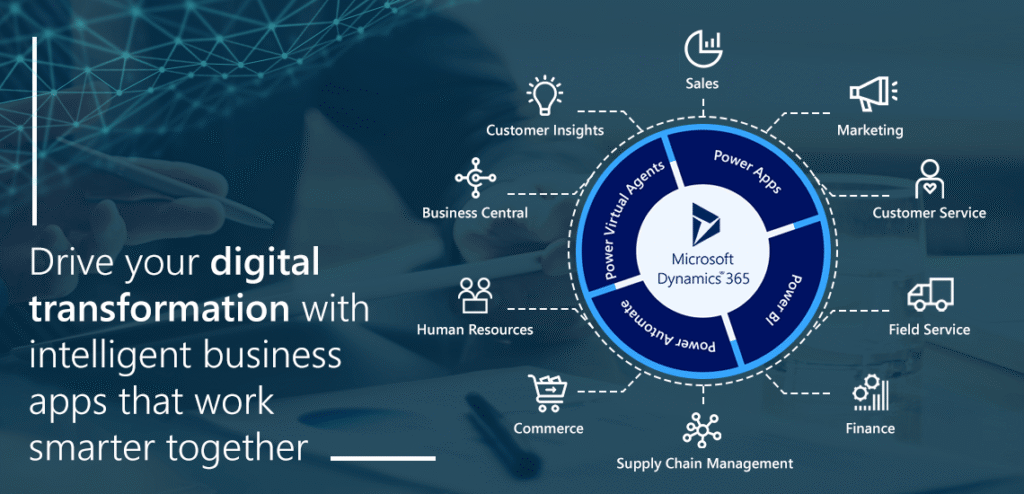
Not so long ago, we had to explain what digital transformation is to our clients and prospects and what it can do for their business. But now, things have completely transformed; most business leaders have started embracing the digital innovation mindset. A recent study also shows that 91% of business leaders see digital transformation as a way of sparking innovation and finding efficiencies. In the wake of the COVID-19 pandemic, one thing is clear that businesses who had embraced the digital transformation or had started their journey towards it were able to maintain business continuity at a significant-level during the lockdown. Generally, digital transformation refers to the advancement that businesses are making toward digitizing everything they do — from managing customers, resources, operations, and finances to sharing information and gaining meaningful insights whenever and wherever they want. Everything that was once manual or paper-based can be digitized and therefore transformed with technology into something more cost-effective and efficient. Regardless of the industry or segment, digital transformation now is a business transformation mantra for every business, and Microsoft Dynamics 365 is a suite of intelligent business applications built specifically to enable organizations to drive digital transformation and evolve from reactive business decisions to proactive insights. Dynamics 365 applications remove the complexity of managing disparate customer relationship management (CRM) and enterprise resource management (ERP) systems. Digital transformation through Dynamics 365 is the integration of digital technology into all areas of a business, from marketing, sales, customer service, and field service, to human resources, supply chain, and finance. Although the benefits of Dynamics 365 are endless, I just want to highlight three key business benefits that help companies achieve tailored modern experiences that market demands. Grow at your own pace Dynamics 365 applications are designed to be deployed independently while seamlessly working together with existing Microsoft applications. So, you can easily start with apps that are the right fit for your business – and pay only for what you use. You can always scale-up/scale-down based on your growing business needs. Streamline business processes Dynamics 365 integrates with low-code solutions like Logic Apps, Power Apps, Power Automate, and Power Virtual Agents to extend the capabilities and solve business challenges through custom apps, workflows, and rich forms. The integration helps. create innovative solutions to increase productivity, simplify processes, and automate repetitive tasks. Make smarter decisions Microsoft Dynamics 365 easily connects with powerful analytics applications and tools, including PowerBI, Cortana Intelligence, and Azure Machine Learning, that help you transform your organization and gain insights that help you make smarter business decisions – better and faster. The COVID-19 has highlighted the importance of accelerating digital initiatives — not as an afterthought, but as a business imperative. We have worked with many companies across several industries and segments on their digital transformation journey and learned a lot along the way. From our experience, digital transformation does not fail due to lack of technology, but due to the fact that the technology is not implemented, integrated, and adopted properly. At Advaiya, we follow a structured process, phase-based approach, and industry-specific frameworks throughout the journey to make technologies work for you and help you make most of your investments. The journey begins with the discovery and envisioning phase, where we work with various stakeholders to understand the organization’s current state and identify potential areas of improvement to plan the future-state and roadmap. The discovery phase is then followed by design and development, implementation and deployment with successful adoption and training phases to deliver the value to our customers. We believe that breaking down the requirements into phases makes the process more manageable and transparent. Instead of having one large deliverable, the phased approach makes the team more productiveas the milestones are well defined, and the development process is more iterative with frequent interaction with the project stakeholders that allows smooth implementation. When all is said and done, we must be aware of the fact that the digital transformation does not automatically kick in when new technologies are brought into the enterprise and does not happen overnight. It is a continuous process to reimagine the overall business transformation based on changing business needs. If you’re excited to embark on digital transformation journey, don’t tackle it alone, we are there to help you! Digital Transformation Let’s start or accelerate your digital transformation journey with Advaiya